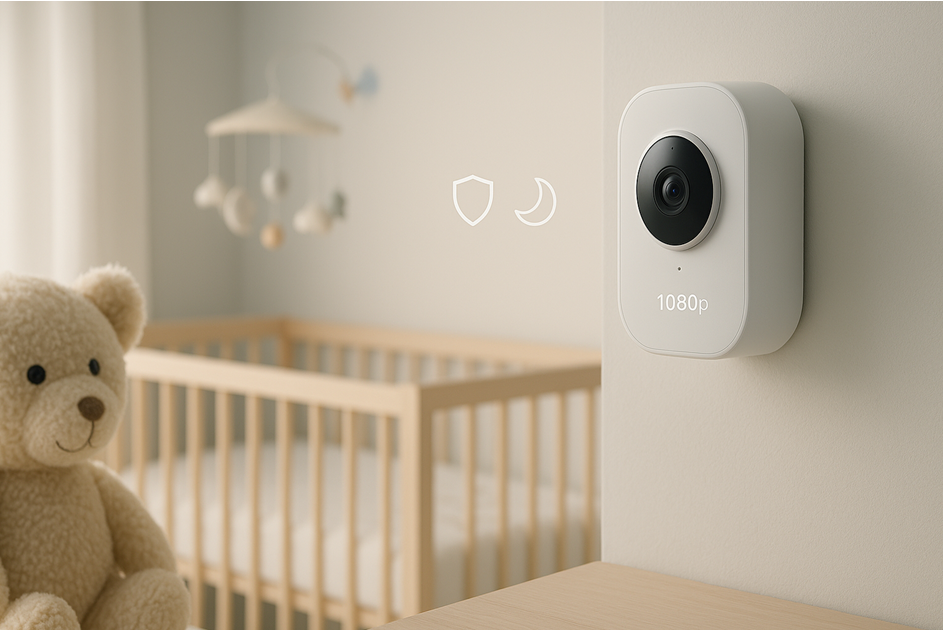
A home security camera can definitely watch over a sleeping baby, but it is not always a perfect one-to-one substitute for a dedicated baby monitor. Installing and testing dozens of indoor cameras and baby cams over the last decade shows this is possible with the right features, smart placement, and realistic expectations. This guide explains how they compare, when a security camera is superior for the nursery and when it is inferior, and how to safely set up any camera for reliable, minimal-fuss monitoring.
How a Home Security Camera Compares to a Baby Monitor
Modern home security cameras often offer 1080p or 2K resolution, sharp night vision, two-way audio, and instant motion or sound notifications. Those features cover the fundamentals parents want from a nursery monitor: a clear view in the dark, the ability to hear fussing, and alerts when there is significant movement or sound. Many security cameras add extras such as pan-tilt-zoom, privacy zones, geofencing, and local microSD storage so you do not need to pay for cloud recording you may not need.
Dedicated baby monitors are built for caretaking. Typical monitor extras include a low-latency handheld screen that works while your phone is charging, built-in temperature sensors, unobtrusive infrared night modes, lullabies or white noise, and some models include cry detection. High-end baby monitors can add breathing or sleep-tracking sensors. If those health-focused features are important to you, a security camera is an accessory not a full replacement.
Video and Audio Quality
- Resolution and detail: Indoor security cams usually win on resolution. Higher clarity helps you see whether eyes are open, a pacifier is in place, or a blanket has shifted.
- Low-light performance: How the camera performs in low light matters more than headline megapixels. Look for cameras with good low-light images rather than relying on specs alone.
- Audio: Expect full-duplex two-way talk and sensitivity tuning so you can hear soft fussing without constant background noise triggering alerts.
Night Vision and Lighting
Infrared night vision is essential. Some cameras use IR LEDs that can reflect off shiny crib rails and cause bright spots. Mount the camera angled slightly down and avoid pointing it directly at reflective surfaces. If your baby is sensitive to light, choose a camera with invisible IR or a switchable, very soft status LED.
Alerts, Detection, and Latency
- Alerts: Motion and sound notifications keep you informed, but excessive pings can become noise. A camera with adjustable activity zones and sensitivity settings is best.
- Latency: Wi-Fi cameras commonly have 2–3 seconds of latency, which is acceptable for checking nighttime wakings. Dedicated baby monitors can feel more reassuring because they often have lower latency and a direct handheld screen.
Power and Reliability
- Plug-in vs. battery: Plug-in cameras are generally more reliable for continuous nursery monitoring than battery-only units.
- Local recording fallback: If your Wi-Fi fails, a camera with microSD support can continue recording locally until the network is restored.
- Wired connections: If you can run Ethernet, a Power over Ethernet (PoE) indoor camera provides continuous, rock-solid recording. Make sure any exposed wires are secured and inaccessible to children.
Privacy and Security
You are putting a networked camera in a sensitive space, so secure it properly:
- Use strong, unique passwords and enable two-factor authentication.
- Prefer cameras offering end-to-end encryption when available.
- If storing locally, consider disabling cloud access.
- Keep firmware updated.
- For more peace of mind, look for on-device processing, HomeKit Secure Video compatibility, or an RTSP option to record to a local NVR.
Health Features and Limitations
Very few home security cameras measure breathing, track sleep cycles, or include accurate ambient temperature sensors. Baby monitors sometimes offer these health-focused tools. If you depend on those features, pair a security camera with a monitor that has them or choose a baby monitor. For most households, clear video, reliable audio, and timely alerts are sufficient.
What to Look For if You Use a Home Security Camera in the Nursery
Resolution and Field of View
Aim for at least 1080p and a field of view between 100–130 degrees for good crib coverage without making the baby look tiny in the frame. If you want to include a play area, consider a pan-tilt-zoom model.
Night Vision That Stays Invisible
Choose cameras with good IR that does not produce a visible glow, and the option to switch off status lights.
Audio You Can Trust
Two-way talk is useful for calming from a distance. Confirm the camera can detect quiet fussing and that the app allows sensitivity adjustment so a white noise machine does not spam alerts.
Sensible Notifications
Use activity zones around the crib, person detection you can disable at night, and scheduling so your phone does not get flooded with unnecessary alerts.
Local Storage and Smart Retention
Local microSD or NVR recording avoids subscription fees and protects against cloud outages. If you use cloud backup, pick a plan that offers event-based clips and customizable retention.
Stable Connectivity
Dual-band support (2.4 GHz and 5 GHz) gives flexibility. If possible, put smart devices on a separate SSID to reduce congestion. App reliability is as important as bandwidth; the live view should load quickly and recover after lock screens or interruptions.
Smart Home Integrations
Support for Alexa, Google Assistant, and Apple Home can be convenient for quick checks on smart displays. Restrict access to only the displays you control and limit guest access.
Mounting and Safe Placement
Mount the camera high and angle it down so the crib fills most of the frame and it remains out of reach. Fasten securely to walls, use cord covers, and follow pediatrician recommendations to keep cords away from the crib. For renters, a corner shelf can offer a good bird’s-eye view without drilling.
Setup Tips and Best Practices
- Plan sightlines so crib rails do not block the baby’s face when they roll.
- Turn on night vision and verify you can see breathing movements without excessive zoom.
- Create an activity zone around the mattress and lower sensitivity until normal room activity no longer triggers alerts.
- Test two-way talk at low volume so you do not accidentally wake the baby.
- Verify reliability over an entire day: test live view reconnect speed, switching between Wi-Fi and cellular, and confirm local recording continues when the internet goes down.
- Perform monthly checks: firmware updates, storage health, and that two-factor authentication is active.
Pros and Cons – Straight Up
Pros
- Better video than many standard monitors.
- Customizable smart alerts and activity zones.
- Reusable for home security after the crib phase.
- Options for local recording to avoid subscription fees.
Cons
- Potential latency and dependence on a phone app instead of a dedicated handheld screen.
- Lack of built-in health-specific sensors on most models.
- Requires careful security configuration to protect privacy.
A good indoor security camera is more than enough for most families who want clear eyes on the crib and reliable pings when someone wakes up.
Real-World Test Notes
In testing, indoor IP cameras with robust low-light performance and quiet motorized pan-tilt performed best. A top-down corner mount about seven feet high, angled so the mattress filled the bottom two-thirds of the feed, gave the most useful view. Turning off person detection at night and creating a single activity zone over the crib reduced false alerts significantly. I also set the app to open directly to the live feed to save time late at night. Small tweaks like these matter more than chasing the highest resolution.
Safety and Privacy Considerations
Treat the nursery as a sensitive space:
- Use unique passwords and two-factor authentication.
- Limit shared access; do not share account credentials.
- Keep firmware and the camera app updated.
- If you prefer maximum privacy, disable all remote/cloud connections and use local-only recording behind a router firewall.
- Secure mounts and cover or route cords so there are no hazards within reach of the crib.
The Bottom Line
A home security camera can serve as a baby monitor when you choose the right model and configure it carefully. Look for dependable night vision, customizable alerts, reliable app performance, and strong security settings. Understand that health-specific monitoring features will usually require dedicated baby-monitor hardware. For most households, the combination of sharp video, smart home compatibility, and long-term reusability makes an indoor security camera an excellent purchase for nursery monitoring and later home protection.
Frequently Asked Questions
Can you use a home security camera as a baby monitor?
Yes, if installed securely and privacy is considered. Use strong authentication, keep firmware updated, and position cables out of reach. Many parents successfully use a home security camera for nursery monitoring.
What will I lose by not having an actual baby monitor?
You might miss health-related features such as breathing sensors or integrated temperature readings. If those are must-haves, pair the camera with a monitor that offers them or choose a baby monitor with those features.
Do I need 2K or 4K video for the crib?
1080p is usually enough if night vision is good and the camera is properly aimed. Higher resolution helps detail but does not fix poor low-light performance or bad placement.
Which type of alerts work best at night?
One activity zone around the mattress with medium sensitivity works well. Sound alerts for crying are useful, but tune them so white noise machines do not trigger constant pings.
Can I watch the nursery on a smart display?
Yes, if your camera supports Alexa, Google Assistant, or Apple Home. Only enable this on displays you control and restrict guest access.
Is local storage better than cloud for a nursery?
Local storage avoids monthly fees and keeps video at home. Cloud storage offers remote convenience. Many families use both to get the best of both worlds.